
Every laboratory in this catalogue is worked inside the same virtual environment, and this tutorial is where its habits are learned. Immersive simulation is now a standard training tool in science education for the same reason flight simulators are standard in aviation: the student practises real procedures — donning protective equipment, weighing, measuring volumes, testing pH — with none of the risks of real chemicals and with the freedom to restart at any moment. The techniques themselves are the real ones: an electronic balance is tared before use, a volume is read at the bottom of the meniscus, a solution’s pH is judged by comparing an indicator’s colour against a chart. In this tutorial, you will learn to move and interact in the virtual laboratory with hand tracking or controllers, put on the personal protective equipment, and then take on four short challenges: weigh a powdered solid on the electronic scale, measure a volume of liquid with a graduated cylinder, prepare a solution from a solid sample and check its pH with an indicator, and finally review and send your results from the tablet.
Educational Goals
Familiarization with the virtual environment
- Navigate the virtual laboratory and pick up, use and release objects with hand tracking or with the controllers.
- Use the tablet’s menus to review results, send them, and restart the experience if something goes wrong.
Use of protective equipment
- Put on the lab coat, safety glasses and nitrile gloves before any experiment, building the habit that safety precedes procedure even where nothing can actually splash.
Measurement of substances
- Weigh a powdered solid with the electronic scale, using the Tare button so the weighing boat’s mass is excluded automatically.
- Measure the volume of a liquid with a graduated cylinder, reading at the bottom of the meniscus.
Basic chemical experimentation
- Prepare a solution by dissolving a solid in water and test its pH with a liquid indicator against the pH chart.
Analysis and communication of results
- Review the collected results on the tablet and send them, practising the documentation step every real laboratory ends with.
Protocol
Start by familiarizing yourself with your environment. Different laboratory instruments will be made available to you so that you can conduct some experiments.
In the upper right corner of your workspace, there is a button. You can switch between virtual reality and augmented reality at any time by pressing this button.
- To pick up an object with hand tracking, place your open hand opposite the object, when the object turns green (a symbol that it can be picked up), completely close your fist to pick up the object.
- To release the object with hand tracking, you simply have to reopen the hand.
- To grab an object with the controllers, place your hand opposite the object, when the object turns green (symbol that it can be picked up), press and hold the pickup button.
- To release the object with the controllers, simply release the pickup button.
You can return to the Meta menu at any time by pressing the device’s menu access button or, in hand tracking mode, by making the gesture indicated in the quick instructions.
In case of a problem, you can also reset the experience by pressing the Restart button on the tablet. This can be found in the options menu, which is accessible from the main menu.
Locate the laboratory safety equipment.
- The lab coat, safety glasses, nitrile gloves and thermal protection gloves will be useful to protect you against the dangers of various experiments.
- To use a laboratory equipment with hand tracking, place your open hand facing the equipment, when the equipment turns green (symbol that it can be used), fully close your fist, then reopen your hand to use it.
- To use a laboratory equipment with controllers, place your hand opposite the equipment, when the equipment turns green (symbol that it can be used), press the pickup button, then release the pickup button to use it.
Here are now some challenges to take on to familiarize yourself with the equipment of this virtual laboratory.
Before any experiment, it is important to equip oneself with the appropriate protective gear.
- Put on the smock.
- Put on the safety glasses.
- Put on the nitrile gloves.
The scale
Some laboratory instruments can be used to collect and transport solid or liquid substances.
Among these instruments, some, like the tweezers or the pipette, require an additional action for their operation.
In hand tracking mode, once the interactive object is picked up, join the thumb and index finger to activate the object’s interaction.
With the controllers, press the interaction button to operate the object.
Some laboratory instruments may require pushing buttons. To push a button, press it with a finger.
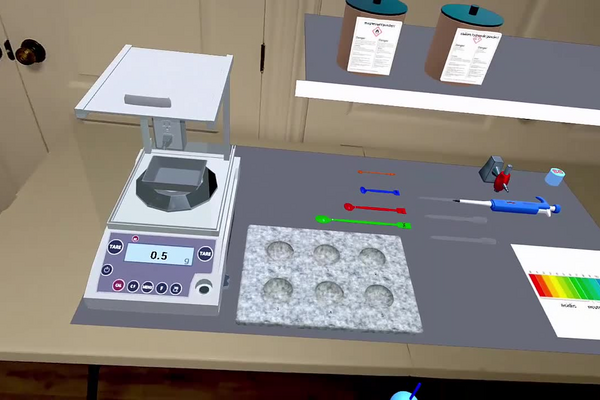
- Place the weighing boat on the platform of the electronic scale.
- Press the Tare button on the scale to set it to zero.
- Place 5 mL of magnesium powder in the weighing boat using a spatula. The spatulas are calibrated to 5 mL, 2.5 mL, 1 mL and 0.12 mL.
- Throw the magnesium powder into the black recovery bin.
Volume of a liquid
Some laboratory instruments, such as beakers, Erlenmeyer flasks, test tubes, or graduated cylinders, can be used to contain a liquid, a solid, or even to create a solution.
Several products will be made available to you from the start of a laboratory in containers. You will also have access to the sink on your right to get water.
- Open the cold water tap.
- Fill a 500 mL beaker with water.
- Close the cold water tap.
- Using the graduated cylinder, measure 50 mL of cold water from the 500 mL beaker. Be careful to correctly identify the meniscus!
The pH
Depending on the molecules to be mixed during the experiment, you can generate a reaction that can influence the physical and chemical properties of the solution.
- Collect 0.12 mL of sodium hydroxide (NaOH) powder with the orange spatula and place the powder in a test tube.
- Using the wash bottle, fill a 50 mL beaker with distilled water.
- Take 10 mL of water from the beaker using the pipette.
- Transfer 5 mL of the sampled water into the test tube (each press gives 1 mL).
- Close the test tube using a rubber stopper.
- Mix by shaking the contents of the test tube until completely dissolved.
- Remove the rubber cap.
- Using the dropper, draw up the solution contained in the test tube.
- Transfer the entire contents of the dropper into a well of the spot plate (the dropper contains about 20 drops).
- Add a drop of pH indicator to the same well of the well plate using another dropper.
- Observe the obtained color and compare it to the pH chart.
Results
A portion of the results can be analyzed in the results section of the tablet. This section can be accessed from the main menu.
To send your results, a Send Results button is located in the options menu of the main screen.
- Observe the results obtained.
- Send the results.
Anticipated Outcomes
This tutorial demonstrates skills rather than testing a hypothesis: by the end of it the student can move and manipulate equipment in the virtual laboratory, dress for the bench, tare a balance, read a meniscus, prepare a solution and judge its pH, and send in results. The challenges have definite expected readings. Mg has a density of 1.74 g/mL, so the 5 mL spatula portion placed in the tared weighing boat should read 8.7 g. In the pH challenge, 0.12 mL of NaOH powder is 0.2556 g, which is 0.0064 moles; dissolved in 5 mL of water this gives a concentration of about 1.3 M, and the pH is about 14 — at the very top of the indicator scale, so the well in the spot plate should turn purple. A strongly basic result from a small scoop of white powder is also a quiet lesson in why the gloves and glasses went on first.
Summary of Assignment by Grade Range
Grade 9–10
Focus: fluency in the environment and correct basic technique. Students complete all four challenges with guidance: PPE on before anything else, the scale tared before the powder goes in, the meniscus read at eye level, the indicator colour matched against the chart. Success is procedural — every step of the protocol executed in order and the results sent from the tablet.
Grade 11
Focus: the measurements behind the gestures. Students explain what the Tare button removes from the reading and how that compares with weighing by subtraction, convert between the volume a calibrated spatula delivers and the mass it implies, and follow the pH challenge quantitatively as far as the concentration: 0.2556 g of NaOH is 0.0064 moles, and in 5 mL that is about 1.3 M.
Grade 12 / College Level
Focus: the chemistry of the final challenge. Students complete the pH calculation — a 1.3 M solution of a strong base has a pH of about 14 — and explain why the indicator sits at the top of its scale, what an indicator actually is, and why the reading would barely move if the solution were twice as concentrated. They also assess the tutorial critically as an instrument: which real-bench skills transfer directly from the simulation, and which (smell, heat, the weight of glassware) it deliberately leaves out.
Laboratory essentials
Instruments
- Beakers (50 mL, 500 mL)
- Well plate
- Droppers
- Electronic scale
- Graduated cylinder (70 mL)
- Pipette
- Spatulas (calibrated: 5, 2.5, 1 and 0.12 mL)
- Test tube
- pH chart
- Weighing boat
- Wash bottle
- Rubber stopper
- Lab coat, safety glasses and nitrile gloves
- Recovery bin
Products
- NaOH(s) powder
- Mg(s) powder
- Liquid pH indicator
- Tap water and distilled water